

Key Features:
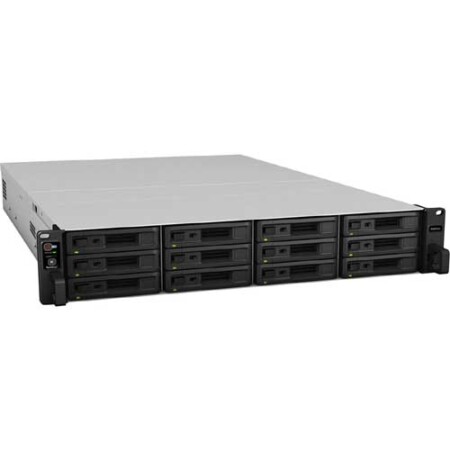
- 12 x 3.5″/2.5″ SATA Drive Bays
- 2.1 GHz Intel Xeon D-1541 Eight-Core
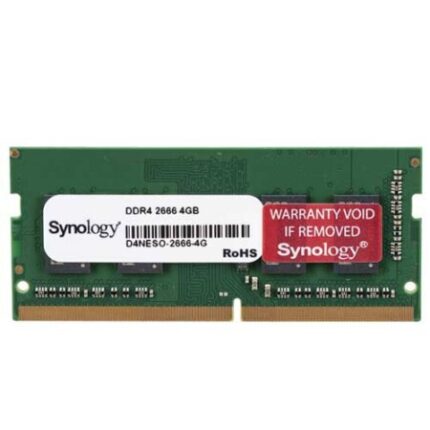
- 8GB of DDR4 ECC RAM
- 2 x 10GbE | 4 x 1GbE
- 2 x USB 3.2 Gen 1 Type-A Ports
- RAID 0, 1, 5, 6, 10, Basic, F1, and JBOD
- 2 x PCIe 3.0 x8/x8 Slots
- Dual Redundant 500W Power Supplies
- AES-NI Hardware Encryption Engine
- Synology DiskStation Manager OS
Specifications:
Number of Bays
12 x 2.5″/3.5″
Inputs/Outputs
2 x USB-A 3.0 / 3.1/3.2 Gen 1
2 x RJ45 10GbE
4 x RJ45 Gigabit Ethernet
2 x Infiniband
Show More
Compatible Drive Interface
SATA III
RAID
RAID 0, 1, 10, 5, 6, F1, JBOD
Computing
CPU
2.1 to 2.7 GHz 8-Core
Processor
Intel Xeon D-1541
Total Installed Memory
8 GB ECC DDR4
User-Replaceable Memory
1 x 8 GB
Total Memory Slots
4 x DIMM
Maximum Memory Capacity
64 GB
General Features:
Accelerate Your Business Options
The 12-bay RS3621xs+ is capable of delivering random 4K reads of over 238K IOPS and a sequential read throughput of 5819 MB/s, making it a true enterprise powerhouse. With full power supply redundancy, an 8-core processor, ECC memory, advanced snapshot technology, and file self-healing, the RS3621xs+ provides a reliable foundation to any data-driven business.
Storage You Can Trust
The RS3621xs+ keeps your data protected while you concentrate on delivering results to your customers, even when disaster strikes.
Redundant Power
Dual PSUs provide protection against a PSU failure or accidental cord removal while hot-swappable fans allow them to be replaced without powering down the system.
Maximize Service Availability
Synology High Availability (SHA) pairs two identical units together creating an active-passive cluster with minute-level failover.
Next-Generation File System
Btrfs prevents data corruption and reduces maintenance overheads with advanced storage technologies and optimized snapshots.
Tailored to Your Business
The RS3621xs+ includes two PCIe slots for performance, networking, and storage upgrades enabling it to adapt to any business environment.
Double Bandwidth
Upgrade network bandwidth in minutes by 2x or more with Synology’s range of 10GbE NICs.
SSD Cache
Boost read/write IOPS by up to 16 times by enabling SSD cache with Synology M.2 NVMe adapter cards and SNV3500 SSDs or by installing one or more 2.5″ SAT5200 SSDs.
Storage Expansion
Quickly and easily scale up to 36 drives with two RX1217(RP) expansion units.
Keep Disaster at Bay
Hyper Backup
A comprehensive backup and recovery solution for securing data stored on Synology servers. Backup data locally, to another Synology device, rsync server, or cloud-based storage such as Google Drive, Dropbox, S3-compatible destinations, and Synology C2. Deduplication, integrity checks, and incremental transfer technology reduce bandwidth and storage used.Snapshot Replication
Easily schedule flexible point-in-time backups of shared folders and iSCSI LUNs with an RPO as low as 5 minutes and recovery in seconds. Set up replication and failover to other Synology storage systems for fast RTOs and minimal service disruption.
A comprehensive backup and recovery solution for securing data stored on Synology servers. Backup data locally, to another Synology device, rsync server, or cloud-based storage such as Google Drive, Dropbox, S3-compatible destinations, and Synology C2. Deduplication, integrity checks, and incremental transfer technology reduce bandwidth and storage used.Snapshot Replication
Easily schedule flexible point-in-time backups of shared folders and iSCSI LUNs with an RPO as low as 5 minutes and recovery in seconds. Set up replication and failover to other Synology storage systems for fast RTOs and minimal service disruption.
Back Up Your Entire IT Infrastructure
Active Backup Suite
Enables administrators to easily backup the entire IT infrastructure to their NAS, including Windows & Linux workstations and servers, file servers, VMware and Hyper-V virtual machines, and Microsoft 365 and Google Workspace accounts. Backups benefit from deduplication, multi-versioning, and optimizations to reduce bandwidth and storage used.
Enables administrators to easily backup the entire IT infrastructure to their NAS, including Windows & Linux workstations and servers, file servers, VMware and Hyper-V virtual machines, and Microsoft 365 and Google Workspace accounts. Backups benefit from deduplication, multi-versioning, and optimizations to reduce bandwidth and storage used.
Storage for Virtualization
Synology iSCSI storage supports mainstream virtualization solutions with an easy management interface to enhance usability. VMware vSphere 6.5 and VAAI integration helps offload storage operations. Windows Offloaded Data Transfer (ODX) speeds up data transfer. OpenStack Cinder support turns your Synology NAS into a block-based storage component. Additionally, Synology Storage Console enables even more simplified storage provisioning and management options in VMware and Windows environments
Complete Surveillance Solution
Synology Surveillance Station transforms the RS3621xs+ into a feature-packed Network Video Recorder solution. Support for up to 90 IP cameras and video analytics such as motion detection, no idle zone, foreign object detection, and anomaly detection cater to the most common surveillance scenarios.
Secure and Private
AES 256-bit encryption adds additional security to the locally-stored footage.
Access from Anywhere, Anytime
Access recordings and live streams whenever you want using a web browser, desktop client, or the DS cam mobile app.
Real-Time Alerts
Email, SMS, or push notifications alert you when incidents occur or predefined conditions are met.
Works with Synology Drives
Engineered to handle intensive 24/7 workloads, Synology drives, including the 3.5″ HAT5300 HDD, M.2 SNV3000 SSD, and 2.5″ SAT5200 SSD consistently deliver top-grade performance.
Powered by Synology DiskStation Manager
The RS3621xs+ runs Synology DiskStation Manager (DSM), the web-based operating system with applications and services designed specifically for businesses.
Central Management System
Conveniently manage your fleet of Synology NAS from a centralized console.
Synology Drive
Instantly access your NAS files across multiple devices whenever you want, wherever you are.
Collaboration Suite
Satisfy all team collaboration needs behind the safety of your own private cloud with Synology Office, Calendar, and Chat.
Virtual Machine Manager
Run various operating systems in isolated sandboxes. Seamlessly clone, store, and migrate virtual machines.
Security
Secure data with comprehensive built-in security tools to protect your devices against evolving threats.
Public Cloud Integration
Back up and synchronize data easily between public cloud accounts and your NAS.
Limited 5-Year Warranty
Synology is committed to product innovation and quality. The RS3621xs+ is backed by a limited 5-year warranty that includes technical support and hardware replacement services to maximize your return on investment.
Synology Replacement Service (SRS)
SRS provides free advance replacement units as early as the next business day in selected regions, maximizing the service uptime for your mission-critical storage and ensuring your business continuity
Optimized for Data Protection and Integrity
Powered by Synology DSM, Synology’s unified data management operating system, and built upon the Btrfs file system, data stored on the RS3621xs+ is safely guarded by modern data protection technologies.
Advanced Snapshots Technology
Provides schedulable and near-instantaneous data protection of shared folders and LUNs.
File and Folder-Level Data Restoration
Enables restoration of specific files or folders.
Flexible Storage Quota System
Helps admins effortlessly manage available space by specifying storage limits for shared folder.
File Self-Healing
Detects and recovers corrupted files using mirrored metadata and RAID configurations.
Inline Compression
Compresses data before writing it to the drive, reducing write commands and optimizing storage space.
Virtualization and Certified Storage
DSM streamlines the provisioning and management of storage for virtual machines (VM). Certified for VMware vSphere, Microsoft Hyper-V, Citrix XenServer, and OpenStack, it integrates with your virtualization platform of choice through iSCSI or NFS protocols. Install Synology Storage Console on VMware or Windows platforms for additional management convenience and functionality right in the hypervisor.
Synology Virtual Machine Manager
A hosted supervisor for virtual machines running Windows, Linux, or virtualized versions of DSM with recovery mechanisms that help ensure data protection on each VM.
Data Backup Solutions for IT Infrastructure
Synology Active Backup Suite
A collection of license-free backup solutions built to help protect Windows systems and servers, VMs, other file servers, and cloud-based storage.Active Backup for Businesses (ABB)
Consolidates backup tasks for physical and virtual environments and enables rapid restoration of files, entire physical machines, and VMs.Active Backup for G Suite
Enables backup of Google Workspace data, including Gmail, Contacts, Calendar, and Drive.
A collection of license-free backup solutions built to help protect Windows systems and servers, VMs, other file servers, and cloud-based storage.Active Backup for Businesses (ABB)
Consolidates backup tasks for physical and virtual environments and enables rapid restoration of files, entire physical machines, and VMs.Active Backup for G Suite
Enables backup of Google Workspace data, including Gmail, Contacts, Calendar, and Drive.
Active Backup for Microsoft 365
Enables backup of Microsoft 365 data, including OneDrive for Business, SharePoint Online, emails, contacts, and calendar.